Bring Free Customers With Google Business Profile (2025)
Today I will share with you about a tool that can change your business. This is Google Business Profile (formerly known as Google My Business) – a free tool that can help you reach your local customers.
🧭 Why Google Business Profile is important for your business?

When I started marketing in the early 2000s, we had to advertise or distribute pamphlets in local newspapers. But in today’s digital age, customers are first looking for Google. Did you know, 46% of customers do Google searches for their local businesses? And among those who search Google, 76% of customers visit that business on the same day!
Google Business Profile makes your business visible to Google Maps and Search Results, which helps you to get customers for free. It’s not just a listing, it’s a digital showcase of your business.
💡 What is Google Business Profile and how does it work?
Google Business Profile is a free tool from Google that helps businesses manage their online presence. It allows you to display your business information on Google Search and Maps, such as:
- Your business name, address and phone number (NAP)
- Website Links
- business schedule
- Photos and Videos
- Customer Reviews
- Q&A section
- Posted and Updated
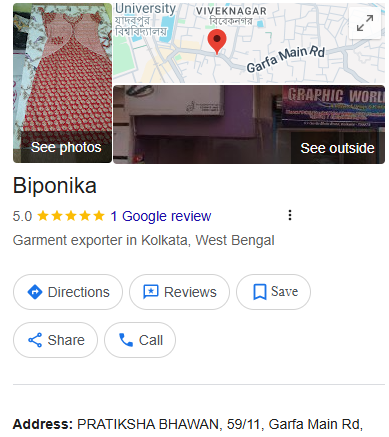
When a customer searches for your business category or local area, Google can show your business profile to them, which helps you to get new customers.
An example of a Google Business Profile on the left
🔢 Step-by-Step Google Business Profile
I will show you step by step how you can setup your Google Business Profile:
Create Google Account
If you don’t already have a Google account, first go to accounts.google.com and create an account. I always recommend that you use a separate Google account for your business, which will be different from your personal account.
Go to Google Business Profile
Go to google.com/business and click the ‘Manage Now‘ button. You need to log in to your Google Account.
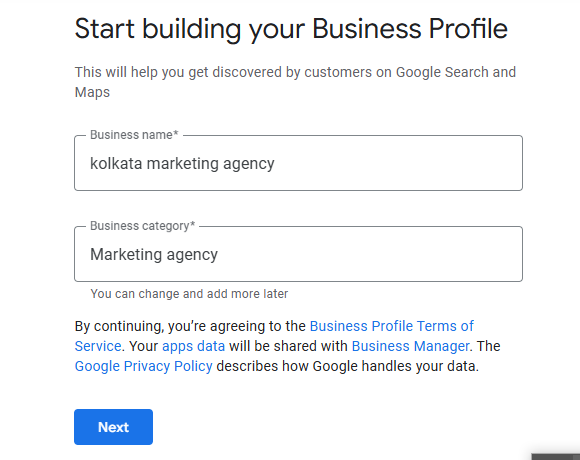
Enter Your Business Name
Enter your business name. Remember, this should be your real business name, don’t add any keywords or additional information.
Select Business Category
Google will give you a list of categories. Select the most relevant category for your business. You can add multiple categories, but the main category is the most important.
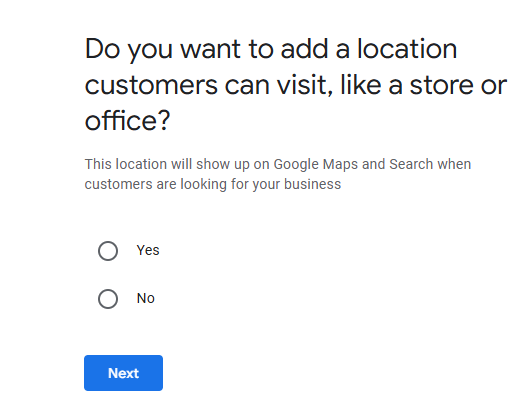
Add your location
Enter your business address. If you don’t have a physical store and you only serve online or to customers, you can select the ‘I deliver goods and services to my customers’ option.
Add contact information
Add your phone number and website link. I always recommend that you use a tracking phone number so you can know how many customers are calling you from Google Business Profile.
Verify Your Business
Google will ask you to verify your business. Generally, Google will send a postcard to your address that contains a verification code. In some cases, you can also verify by phone or email.
Complete Your Profile
After verification, complete your profile:
- Add Business Schedule
- Enter the detailed description
- Upload photos and videos
- Add Service or Product
- Select attribute (eg: ‘Wheelchair Accessible’, ‘Women-Owned’)
⚙️ Strengthen your profile
Not only do you need to create profiles, you have to optimize it so that it is attractive to customers. From my 20 years of experience, here are some techniques:
📸 Use high-quality photos
Business profiles with photos get 42% more requests and 35% more website clicks. Add pictures of your business inside, outside, products, stuff and customers. Make sure photos are high-resolution and well taken in light.
⭐ Manage customer reviews
Reviews are extremely important for your business. I always say, ‘Review is the new word-of-mouth’. Here are some tips:
- Reply to all reviews, both positive or negative
- Encourage customers to leave reviews
- Deal with negative reviews professionally
- Use QR code to write reviews on your website or in the store
📰 Use Google Posts
Google Posts lets you share updates, offers, events or news to your profile directly. I recommend that you post at least once a week. Posts expire after 7 days, so posting regularly is important.
❓ Optimize Q&A section
Customers can ask questions about your business. You can add simple questions and answers yourself. It helps customers find information and increases their confidence in your business.
📈 Apply local SEO techniques
Use local keywords in your business description. For example, if you manage a restaurant in Kolkata, you can use keywords like ‘Kolkata’s Best Bengali Food’ or ‘Kolkata’s Popular Restaurant’.
⚖️ Advantages and Disadvantages of Google Business Profile
Google Business Profile has been a game-changer for many businesses, but it also has some limitations.
✅ Benefits:
- Free Use: It is completely free, you can use it at no cost
- Local Visibility: It helps you reach local customers
- Trust and credibility: A complete profile builds trust in customers
- Customer Interaction: Can communicate directly with customers through reviews, Q&A, and messaging
- Insights and Analytics: You can see how many people are looking at your profile, calling, or going to the website
⚠️ Difficulty:
- Verification process: Sometimes the verification process can be time-consuming
- Negative reviews: Negative reviews can be harmful to your business
- Google’s controls: Google can change their rules at any time
- Competition: Your competitors may also use the same tool, so competition can increase
🧩 Best Strategy for Local Businesses
Here are some techniques that are particularly useful for local businesses:
🎉 Create local events and offers
Is there a special day or festival coming in your area? Create special offers accordingly and share them on Google Posts. For example, you can announce special discounts during Eid or special offers during Puja.
🤝 Create local partnerships
Build partnerships with other businesses in your area. For example, if you manage a restaurant, you can partner with nearby hotels and offer special discounts to their customers.
🏘️ Create local content
Create content about your area and share it on Google Posts. For example, you can create a post like ‘History of Kolkata: 5 historical places near our restaurant’.
📣 Work with local influencers
Find the influencers in your area and ask them to visit your business. Add their reviews and photos to your profile.
❤️ Stay connected to the local community
Participate and sponsor community events in your area. Add it to your business profile and share photos.
🧠 Things to remember
In my experience, many traders create Google Business Profile but make some common mistakes. Here are some things you should keep in mind:
NAP compatibility: Keep your business name, address and phone number (NAP) the same everywhere.
Regular updates: Update your profile regularly, especially during business schedule changes.
Google Rules: Follow Google’s rules, otherwise your profile may be suspended.
Dealing with negative reviews: Do not ignore negative reviews, deal professionally.
Avoid False Information: Never confuse customers with false information.
🏆 Success Story: Kolkata Business Examples
I would like to give you some practical examples that I have worked on myself:
🍛 A restaurant in Kolkata
There was a small restaurant in Kolkata that used to get only 10-12 customers per day. I helped them create Google Business Profile, add high-quality photos, and encourage customers to give reviews. Within 3 months, their subscriber count increased to 30% and they were ranked on Google Maps as ‘the best Bengali food in the picnic garden area.
👗 A clothing store in Gariahat
There was a clothing store in Gariahat who wanted to increase online sales. I helped them add their new collection, special offers and stuff picks to their Google Business Profile. We also worked with local influencers. Within 6 months, their website traffic increased to 50% and their online sales increased by 40%.
✈️ A travel agency in Siliguri
There was a small travel agency in Siliguri who wanted to target local tourists. I helped them add photos, travel tips and special packages to local tourist places in their Google Business Profile. We added general questions and answers to the Q&A section. Within 4 months, their phone calls increased by 60% and they started receiving more requests from local tourists.
📊 Measuring Success: What Metrics to Track
To measure the success of your Google Business Profile, I recommend that you track the following metrics:
- Views: How many people are looking at your profile
- Search Query: What customers are searching for to find you
- Call click: How many people are calling you
- Click Website: How many are going to your website
- Request Direction: How many people are asking for directions to your place
- Number of reviews and ratings: How many reviews are you getting and what is your average rating
You can find this information in the Insights section of Google Business Profile. Review these metrics every month and adjust your strategy accordingly.
🔮 Future trends (2025 and beyond)
Digital marketing is constantly changing. The same is true for Google Business Profile. Here are some trends that may be important in 2025 and beyond:
- Video Content: Video content will be more important. Start adding videos to your business.
- AR and VR: Augmented Reality (AR) and Virtual Reality (VR) will help businesses show their products or services virtually.
- Ai-powered chatbot: Ai-powered chatbot will help customers answer common questions.
- Voice Search: Voice Search will be more popular, so optimize your business name and description for voice search.
- Hyperlocal Targeting: Businesses will be able to target smaller areas, even within certain road or foot distances.
🏁 Conclusion
Google Business Profile is a powerful tool that can help you reach local customers for free. Those who have used this tool correctly, have seen significant growth in their business.
Remember, Google Business Profile is not just setup once, you need to update and optimize regularly. Keep in touch with your customers, answer their reviews, and add new content regularly.
Hopefully, this guide will help you bring new customers to your business using Google Business Profile. If you have any questions, feel free to ask me.
PHONE : 9903490874
References and Resources
- Google Business Profile Official Website
- Google Business Profile Help Center
- Google Business Profile Guidelines
- Local SEO: The Definitive Guide
- The Ultimate Google Business Profile Guide
Thanks, wishing you success in your business!